Cassie McKenzie-Baeten Portfolio

Pearson Vue Test Set-up
About This Project
As part of my role as Academic Advisor, I was also responsible for the base testing center. One of the issues we encountered was a large turn over of testing proctor staff. I created this educational video to help explain the steps a proctor should take when opening the testing center to set up for a Pearson Vue exam.

Tools
Animated Video
Created for GTMO Testing Center
2022
Vyond
Canva
Microsoft Word
My Role
-
Facilitated discussion with testing center proctors about essential steps for Pearson Vue proctoring
-
Utilized policies and procedures guides located on Pearson Vue VSS website
-
Storyboarded video content using Canva
-
Scripted all video content using Microsoft Word
-
Designed and Developed modules using Vyond
-
Designed addition content using Canva
-
Used Canva to create QR code flyers to be Testing Center Proctor Guide
Details
Research
Design Process
After Identifying reported issues with the Proctor Team, I began compiling the steps to successfully proctoring a Pearson Vue exam with the guidance of the VSS Pearson Vue website and the Policies and Procedures guide.

Storyboard
After collecting research I began the storyboarding process using Adobe Captivate Express. This step was helpful in laying out the scene and creating visuals. I used images that would represent the scenes once moved to Vyond. While wanting to be mindful of a time limit we used the storyboarding process to pinpoint the main features we wanted to get across during the videos.

Video Animation
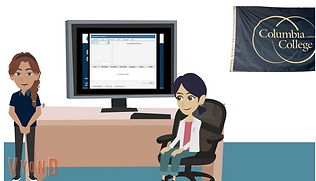
After the storyboarding and scripting process I began creating the videos in Vyond. I was familiar with using Vyond and was able to quickly complete the series of training videos. I used the audio available in Vyond to narrate the video, and was able to recreate the testing center for an immersive learning experience for Testing Proctors.




Final
After the creation and finalization of the video's, I worked with the testing proctors and other testing center locations to collect feedback. Once their feedback was analyzed I made edits as needed. To finalize the project I transferred the videos from Vyond to Youtube and create QR codes using Canva. The QR codes were then printed out, laminated and assembled in the testing center proctor guide.
